
Installing ROS 2 Humble on Ubuntu 22.04 (Jammy Jellyfish)
Robot Operating System (ROS) 2 is a powerful framework for building robotic applications. ROS 2 Humble Hawksbill is the Long-Term Support (LTS) release recommended for Ubuntu 22.04 (Jammy Jellyfish).
This tutorial provides a step-by-step guide to install ROS 2 Humble cleanly on Ubuntu 22.04.
System Requirements
- Operating System: Ubuntu 22.04 LTS (Jammy Jellyfish)
- Architecture: amd64 (x86_64)
- Internet Connection
- Sudo privileges
Set Up System Locale
ROS 2 requires UTF-8 locale because it ensures reliable, global, and consistent text handling across Python, DDS, build tools, and distributed robotic systems.
Open your terminal and type following command
$localeIf UTF-8 is not enabled, run:
$sudo apt update
$sudo apt install locales
$sudo locale-gen en_US en_US.UTF-8
$sudo update-locale LC_ALL=en_US.UTF-8 LANG=en_US.UTF-8 export LANG=en_US.UTF-8
Verify
$locale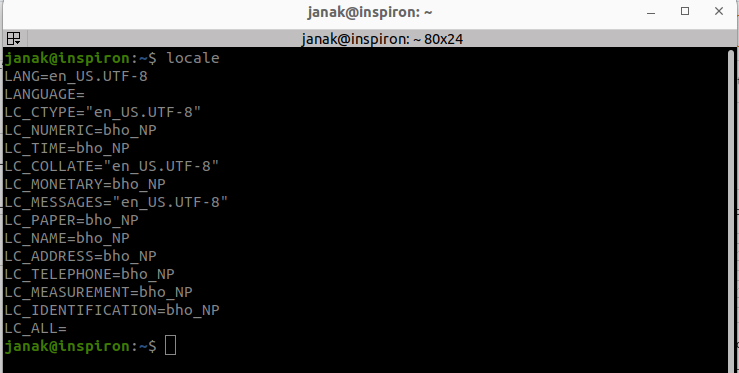
Enable Required Ubuntu Repositories
ROS 2 depends on Ubuntu’s Universe repository, and software-properties-common provides the tools to enable it. Both are mandatory for a successful ROS 2 installation.
$sudo apt install software-properties-common
$sudo add-apt-repository universe
$sudo apt update
Install Required Tools
Install curl, which is used to fetch ROS keys and configuration files.
$sudo apt install curl -yAdd ROS 2 Repository (Recommended Method)
$sudo curl -sSL https://raw.githubusercontent.com/ros/rosdistro/master/ros.key \
-o /usr/share/keyrings/ros-archive-keyring.gpg
Add the ROS 2 APT Source
$echo "deb [arch=$(dpkg --print-architecture) signed-by=/usr/share/keyrings/ros-archive-keyring.gpg] \
http://packages.ros.org/ros2/ubuntu $(. /etc/os-release && echo $UBUNTU_CODENAME) main" | \
sudo tee /etc/apt/sources.list.d/ros2.list > /dev/null
Update package index:
$sudo apt updateUpgrade System Packages (Optional but Recommended)
$sudo apt upgrade -yInstall ROS 2 Humble
Desktop Installation (Recommended)
Includes RViz, demos, and common tools.
$sudo apt install ros-humble-desktop -yDevelopment Tools
$sudo apt install ros-dev-tools -ySource the ROS 2 Environment
Before using ROS 2, source the setup file:
$source /opt/ros/humble/setup.bashVerify installation:
$printenv ROS_DISTRO
Automatically Source ROS 2 on Every Terminal
Add ROS 2 to your .bashrc:
$echo "source /opt/ros/humble/setup.bash" >> ~/.bashrcReload:
$source ~/.bashrcTest ROS 2 Installation (Turtlesim)
Open two terminals.
Terminal 1:
$ros2 run turtlesim turtlesim_nodeTerminal 2:
$ros2 run turtlesim turtle_teleop_key
If a turtle window appears and responds to keyboard input, ROS 2 is installed successfully!
Extra Useful Tools (Optional)
Visual Studio Code
$sudo snap install code --classicTerminator Terminal
$sudo apt install terminator